Skip to page content
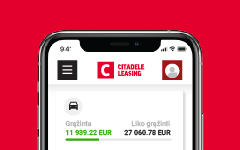
Smartphone with the Citadele mobile app open, displaying the C lite virtual card, with the text

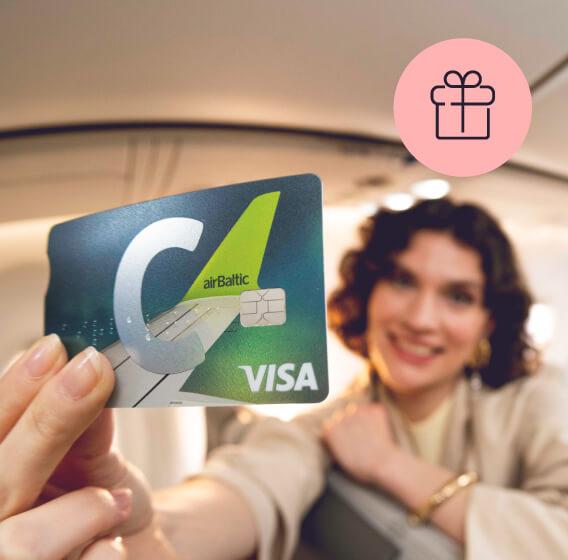
Benefits of the C airBaltic programme

Collect airBaltic Club points with your everyday purchases and exchange them for flights.

Insurance that knows what it means to travel

Extensive travel insurance for you and your family, as well as purchase insurance.*

Everyday benefits

Up to 1500 EUR per month in cash withdrawals worldwide.**

When? Right now! New customers get 3000 airBaltic Club points free.

With the C airBaltic card, everyday purchases work in your favour!

  • Become a Citadele customer and apply for a C airBaltic card.
  • Add the card to your airBaltic Club account in the mobile app.***
  • Receive 3000 airBaltic Club points in your airBaltic Club account.
  • Continue collecting points for everyday purchases (1 EUR = 1 point) and exchange them for flights and other airBaltic Club benefits.

* Insurance service provided by Compensa Vienna Insurance Group ADB, represented by insurance agent AS Citadele banka Lithuanian Branch.
** ATM owner fees may apply.
*** To link your card to your airBaltic Club account and use all C airBaltic programme benefits, you need to download or update the Citadele app to the latest version (46.2+).

Benefits of the C airBaltic card programme

icon

airBaltic Club points

Receive airBaltic Club points for the everyday purchases you make with your card (1 EUR = 1 point) and exchange them for flights and other airBaltic benefits.

icon

Seat reservations

Want to sit by the window or disembark first? Choose your seat in advance for free.

icon

Heavy hand luggage

A total of 12 kg for your hand luggage and personal item.

icon

Other benefits

Earlier online check-in.
Airport check-in and luggage drop-off at the business class desk.
Priority boarding.
Free mobile data on your trips: 1 GB Saily eSIM.

The benefits apply to airBaltic flights booked through the airBaltic website or app under the name of the card holder and paid for with the C airBaltic card, including one-way and return tickets. The airBaltic Club benefits will be added to the reservation and can be viewed on the airBaltic website under Manage after purchase.

Insurance that knows what it means to travel

  • The card fee already includes travel insurance for you and your family when you travel abroad. Coverage per trip: up to 300 000 EUR.
  • Baggage insurance up to 1500 EUR. Baggage delay of more than 4 hours up to 700 EUR.
  • Trip cancellation, suspension, missed connection flight up to 3500 EUR.
  • Rental car deductible in accordance with your rental agreement when travelling abroad: up to 2000 EUR.
  • Purchase insurance: theft, damage or destruction for 180 days after picking up a product. Total coverage amount of 10 000 EUR, coverage per incident of 5000 EUR.

* Insurance service provided by Compensa Vienna Insurance Group ADB Latvian Branch, represented by insurance agent AS Citadele Banka.

Got plans? We have a solution

C airBaltic will help you achieve your plans and goals. Apply for a credit limit of up to 15 000 EUR – no need to pay for any unused credit limit! Meanwhile, anything you do use gets up to 45 days interest free.

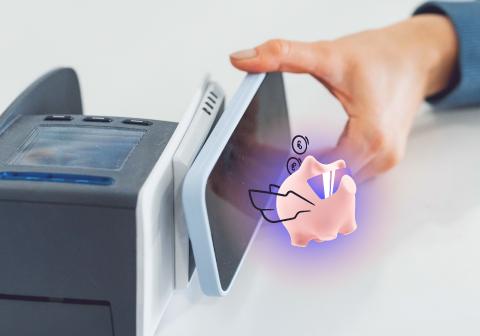
Person pays for a purchase with a phone, and the Citadele app’s smart piggy bank is visible on the screen.

Smart Piggybank: save as you spend

Smart Piggybank is a function in the Citadele app which rounds up your purchases and turns the extra into savings. Set up a piggybank, activate rounding up for your card, use it for purchases, and earn 3% per year*** on your savings. Try it – it’s easy!

Priority Pass

Make use of the privileges offered by Priority Pass: visit more than 1700 business lounges in more than 500 cities in 145 countries. They are great places to relax or work, and to enjoy snacks and drinks before you fly.

Click to Pay payment symbol next to the VISA logo – an online payment option with Citadele C cards.

Click to Pay

Internationally recognized payment functionality that enables convenient and secure online payments without the need to re-enter card details. Click to Pay is also available for C cards and is supported by many online stores worldwide.

Apply for C card without visiting a branch

Apply remotely and become a Citadele customer today.

You will be able to use the online bank and digital services immediately.

You will receive your card by mail within 5 business days.

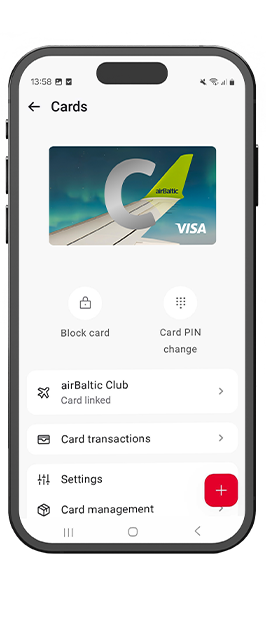
Smartphone screen with the Citadele mobile app open, displaying the Cards section with the visual of the C smart card and available card management functions.
photo
photo

For customers

Order your new C card in Citadele mobile app
or Online bank

Other application methods

online banking

Online bank

If you are our customer, apply for your new C card through the online bank and receive within 5 business days.

Apply
branch

Branch

Make an appointment by filling out the form.

Find your nearest branch
online banking

Online bank

If you are our customer, apply for your new C card through the online bank and receive within 5 business days.

Apply
branch

Branch

Make an appointment by filling out the form.

Find your nearest branch

Need help?

Get instant answers to your questions 24/7 from our website help tool: our virtual financial consultant, Adele.

To activate your card in the online bank:

1. Go to "Accounts and Cards"

2. Select “Activate card” from the left-hand column. Activate by entering the final five digits of your card.

3. Confirm the activation with one of your authorisation tools: a code from your code card, a code from your code calculator or a MobileSCAN code.

Activate within 60 days of receiving your card.

If you have problems accessing the Internet bank see information here.

To activate your card in the Citadele mobile app:

1. In the section Overview press on the card's icon (quick action button) and select your new card;

2. Enter the last 5 digits of the card number;

3. Confirm the activation using one of your authorisation devices: MobileSCAN PIN code, fingerprint, face recognition, or a code from your code card or code calculator. That’s all—you can start using your card.

Activate within 60 days of receiving your card.

Don't have the Citadel app yet? Take a look here.
If there is a problem accessing the app, see here.

Blocking Payment Cards
If you have lost your payment card, noticed unauthorized transactions, or your card got stuck in an ATM, block it immediately using one of the following methods:

  • Block the card using the Citadele mobile app:
    • Log in to the Citadele mobile app and select the “Cards” section.
    • From the list, choose the card you want to block.
    • In the window that opens, tap “Block card”.
    • When the payment card is blocked, you will see the following screen:
  • Block the card using Citadele online banking:
    • Log in to Citadele online banking and select “Accounts and Cards” > “Block card temporarily.” Then choose the card you want to block from the list and click “Next.”
    • Make sure the selected payment card is correct and click “Execute.” Confirm this action using your chosen identification method.
    • The online banking system will automatically process the confirmed action and block your payment card.
    • When the payment card is blocked, you will see the following screen:
  • You can also call +370 5 221 9091.

A new payment card can be ordered by logging in to Citadele Online Banking and selecting “Replace existing card”, or by calling +370 5 221 9091, or by visiting bank branch.

To which countries free money transfers can be made?

You can make an unlimited number of free electronic transfers and payments in Euro from your C smart, C supreme, C prime account to any European Union bank account free within the Single Euro Payment Area (SEPA).

Can I make payments to other countries or in a different currency from my C card account?

Yes. Note that in accordance with the Price list a fee will be applied for the currency conversion.

Can I make instant payments from my C card bank account?

As Citadele supports Instant Payments, you will be able to make Instant Payments from your C smart, C supreme, C prime account to any bank which supports instant payments. The money is transferred within seconds.

Card monthly fee for the granted credit limit:

  • 6 EUR for 0 - 5 000 EUR
  • 7 EUR for 5 001- 10 000 EUR
  • 8 EUR for 10 001- 15 000 EUR

How do I get a discount on the card's monthly fee?
Actively use C prime - pay with the card for goods in stores and online and do not pay the card's monthly fee. Spending 6 000 EUR within 6 months is 50 %. discount on the card's monthly fee. 25 % on spending of 4 500 EUR. discount

Register for the C REWARDS programme and receive C REWARDS points on all purchases online and in stores worldwide (with C smart 2 EUR=1 point, C supreme, C prime 1 EUR = 1 point). Register through xrewards.lt, the Citadele app or online bank.

If you want to become a customer of Citadele Bank and get a C card, you can do it using the mobile application or by visiting one of the bank's branches (only after prior registration by phone +370 5 221 9091). When you become a customer of Citadele bank on the mobile app, we will send your card by mail within three working days.

If you are a bank customer and want to change your existing card, submit a free-form request in the Online bank. If you want to get a C card with a new account, you can order a new card in the "Accounts and cards" section of the Online bank. Please ensure that the correct delivery address is entered. You will receive the card in the mail within three working days.

To activate your card in the online bank:

1. Go to "Accounts and Cards"

2. Select “Activate card” from the left-hand column. Activate by entering the final five digits of your card.

3. Confirm the activation with one of your authorisation tools: a code from your code card, a code from your code calculator or a MobileSCAN code.

Activate within 60 days of receiving your card.

If you have problems accessing the Internet bank see information here.

To activate your card in the Citadele mobile app:

1. In the section Overview press on the card's icon (quick action button) and select your new card;

2. Enter the last 5 digits of the card number;

3. Confirm the activation using one of your authorisation devices: MobileSCAN PIN code, fingerprint, face recognition, or a code from your code card or code calculator. That’s all—you can start using your card.

Activate within 60 days of receiving your card.

Don't have the Citadel app yet? Take a look here.
If there is a problem accessing the app, see here.

Blocking Payment Cards
If you have lost your payment card, noticed unauthorized transactions, or your card got stuck in an ATM, block it immediately using one of the following methods:

  • Block the card using the Citadele mobile app:
    • Log in to the Citadele mobile app and select the “Cards” section.
    • From the list, choose the card you want to block.
    • In the window that opens, tap “Block card”.
    • When the payment card is blocked, you will see the following screen:
  • Block the card using Citadele online banking:
    • Log in to Citadele online banking and select “Accounts and Cards” > “Block card temporarily.” Then choose the card you want to block from the list and click “Next.”
    • Make sure the selected payment card is correct and click “Execute.” Confirm this action using your chosen identification method.
    • The online banking system will automatically process the confirmed action and block your payment card.
    • When the payment card is blocked, you will see the following screen:
  • You can also call +370 5 221 9091.

A new payment card can be ordered by logging in to Citadele Online Banking and selecting “Replace existing card”, or by calling +370 5 221 9091, or by visiting bank branch.

To which countries free money transfers can be made?

You can make an unlimited number of free electronic transfers and payments in Euro from your C smart, C supreme, C prime account to any European Union bank account free within the Single Euro Payment Area (SEPA).

Can I make payments to other countries or in a different currency from my C card account?

Yes. Note that in accordance with the Price list a fee will be applied for the currency conversion.

Can I make instant payments from my C card bank account?

As Citadele supports Instant Payments, you will be able to make Instant Payments from your C smart, C supreme, C prime account to any bank which supports instant payments. The money is transferred within seconds.

Card monthly fee for the granted credit limit:

  • 6 EUR for 0 - 5 000 EUR
  • 7 EUR for 5 001- 10 000 EUR
  • 8 EUR for 10 001- 15 000 EUR

How do I get a discount on the card's monthly fee?
Actively use C prime - pay with the card for goods in stores and online and do not pay the card's monthly fee. Spending 6 000 EUR within 6 months is 50 %. discount on the card's monthly fee. 25 % on spending of 4 500 EUR. discount

Register for the C REWARDS programme and receive C REWARDS points on all purchases online and in stores worldwide (with C smart 2 EUR=1 point, C supreme, C prime 1 EUR = 1 point). Register through xrewards.lt, the Citadele app or online bank.

If you want to become a customer of Citadele Bank and get a C card, you can do it using the mobile application or by visiting one of the bank's branches (only after prior registration by phone +370 5 221 9091). When you become a customer of Citadele bank on the mobile app, we will send your card by mail within three working days.

If you are a bank customer and want to change your existing card, submit a free-form request in the Online bank. If you want to get a C card with a new account, you can order a new card in the "Accounts and cards" section of the Online bank. Please ensure that the correct delivery address is entered. You will receive the card in the mail within three working days.

Any questions about airBaltic flight benefits?