Skip to page content

No surprises. Just protection

Check what your current home or car insurance actually covers and decide if it still fits your needs. Get a tailored offer online in just a few minutes.

Check your insurance in minutes

Understand with ease, choose with confidence

Free and open to
everyone

AS “Citadele banka” provides a tool to review key information about an insurance policy and to obtain an insurance offer. Insurance services are provided by AAS “BTA Baltic Insurance Company” Lithuanian branch, registration number 300665654, address Laisvės pr. 10, 04215 Vilnius, Lithuania, telephone +370 5 2600 600, e-mail: bta@bta.lt, www.bta.lt, on behalf of which acts insurance agent AS “Citadele banka” Lithuania branch, registration No. 304940934, legal address Konstitucijos Ave. 18B, LT-09308 Vilnius. On this page, mandatory car insurance refers to motor third party liability insurance. Before arranging insurance, please carefully read the insurance terms and conditions.

Animation demonstrating how to use the Citadele bank insurance portal, from login to checking insurance details.

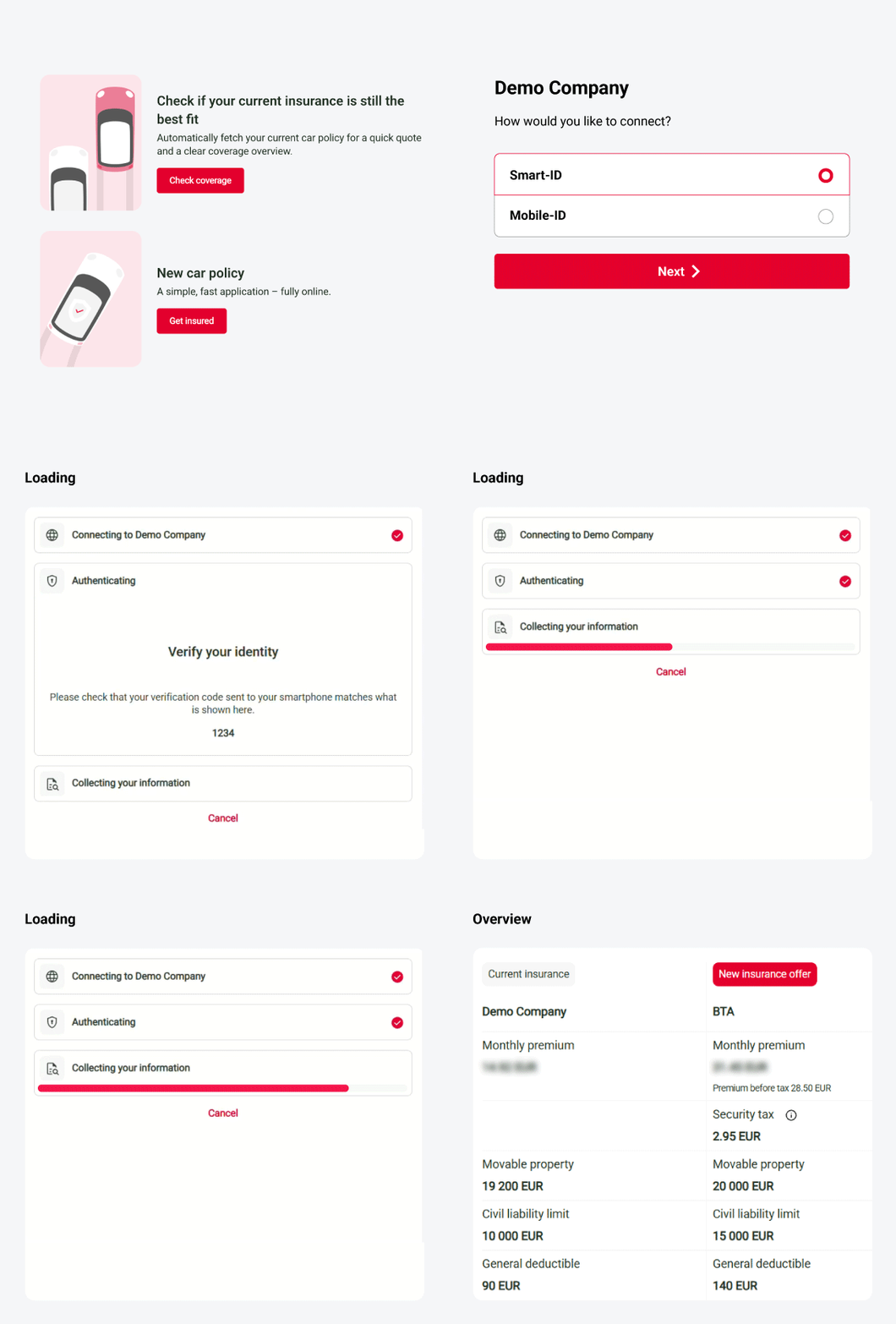
How it works?

Available for everyone. You can check your insurance quickly, securely and free of charge.

  • Choose what you want to check
    Car or home insurance.
  • Choose your insurer
    Select one or more insurers where your policy is issued.
  • Log in securely
    Confirm your identity using Smart-ID or Mobile-ID.
  • See your coverage
    See key information about your current insurance coverage and our offer.

Already insured? Plan ahead. Not yet? Get covered instantly.

Choose your policy start date up to 60 days in advance and secure your price, or buy insurance online in just a few minutes.

Clear insurance. Drive with peace of mind.

  • Easily choose your protection option and review pricing.
  • Casco protection levels and benefits.
  • Roadside assistance and replacement car after an accident.
  • Buy together and save more.

Clear home insurance. More room for living.

  • Broad protection for your home and belongings.
  • Choose your coverage level and see the price clearly.
  • Enjoy up to 30% off now.

When it’s clear, choosing is easy

  • See your current coverage and get a new offer
    Quickly understand what protection you already have and explore your next options.
  • Choose what fits your needs
    Review protection levels and pricing — so you can make decision with confidence.
  • Everything online
    Get an offer and buy insurance whenever it suits you — quickly and easily.

Need help?

Get instant answers to your questions 24/7 from our website help tool: our virtual financial consultant, Adele.

This service helps you review the key information about your existing property insurance policy and get a new offer from AAS BTA Baltic Insurance Company (BTA). You’ll receive an overview of the essential coverage and price of your current policy, making it easier to see whether your current policy still meets your needs.

If you prefer not to view the overview and just want to get a new offer from BTA, you can fill in the details manually instead.

Yes. Your data is handled with the same security standards used in online banking:

  • The data is only accessed after you have given your authorisation;
  • All transfers are encrypted;
  • No login credentials are stored;
  • Only the data that you have given your permission to is collected, therefore, if you want to check your property insurance, information about your other insurance policies will not be retrieved.
     

Yes. You have the legal right to access and share your own insurance data.
This service helps you do that safely and conveniently, fully in line with EU and national data protection laws.
 

  1. You select your property insurance provider from a list of available insurers.
  2. You choose whether to authenticate using Smart-ID or eParaksts. You enter your login credentials, and Insurely (a Swedish technology company) facilitates the connection to your selected insurer’s online system on behalf of you, via the service provided by Citadele. You authenticate with your chosen insurer, and accordingly, in the authentication application (for PIN code entry or biometric confirmation), it will be indicated that you are attempting to log in to the specific insurer you have selected.
  3. By completing the authentication, you grant Insurely permission to access your property insurance information from your current insurer in order to prepare a summary and offer for you.
  4. Your policy data is retrieved once, securely encrypted, and shown inside Citadele’s insurance portal so you can review it easily.
  5. Citadele provides the service together with Insurely, a trusted Swedish technology company that securely connects to your insurance company to collect the information.

Please note that only the data necessary for preparing a new insurance offer is shared with BTA. This includes information about you as the policyholder and the insured object. No details about your existing insurance policy—such as coverage limits or pricing—are disclosed.
 
Please note, that Insurely never access or store your private keys, PINs, or passwords. The authentication tokens returned by Smart-ID and eParaksts contain only pseudonymised metadata necessary for verifying identity and session status.
 

You select your property insurer from the provided list and confirm the connection using Smart-ID or eParaksts. Insurely AB, a Swedish technology company, enables a secure connection to your insurer’s online system. During authentication, your authentication app will display the specific insurer for which you are confirming the connection.

When you authenticate, you instruct Citadele, via Insurely, to provide one – time access to your insurance information in order to prepare a summary and an offer in Citadele’s insurance portal. All data are encrypted.

Only the information needed to prepare a new offer is shared with BTA—details about you as the policyholder and the insured property. Commercially sensitive information about your existing policy, such as limits or prices, is not shared.

When facilitating the data access, Insurely never requests or stores your private keys, PIN codes, or passwords. Smart-ID and eParaksts authentication tokens contain only pseudonymized metadata needed to verify identity and session status.

In Citadele’s insurance portal, you’ll receive a offer from BTA with additional benefits when you apply online. You’re under no obligation to accept the offer – it’s there to help you easily choose the solution that suits you best.

This service helps you review the key information about your existing property insurance policy and get a new offer from AAS BTA Baltic Insurance Company (BTA). You’ll receive an overview of the essential coverage and price of your current policy, making it easier to see whether your current policy still meets your needs.

If you prefer not to view the overview and just want to get a new offer from BTA, you can fill in the details manually instead.

Yes. Your data is handled with the same security standards used in online banking:

  • The data is only accessed after you have given your authorisation;
  • All transfers are encrypted;
  • No login credentials are stored;
  • Only the data that you have given your permission to is collected, therefore, if you want to check your property insurance, information about your other insurance policies will not be retrieved.
     

Yes. You have the legal right to access and share your own insurance data.
This service helps you do that safely and conveniently, fully in line with EU and national data protection laws.
 

  1. You select your property insurance provider from a list of available insurers.
  2. You choose whether to authenticate using Smart-ID or eParaksts. You enter your login credentials, and Insurely (a Swedish technology company) facilitates the connection to your selected insurer’s online system on behalf of you, via the service provided by Citadele. You authenticate with your chosen insurer, and accordingly, in the authentication application (for PIN code entry or biometric confirmation), it will be indicated that you are attempting to log in to the specific insurer you have selected.
  3. By completing the authentication, you grant Insurely permission to access your property insurance information from your current insurer in order to prepare a summary and offer for you.
  4. Your policy data is retrieved once, securely encrypted, and shown inside Citadele’s insurance portal so you can review it easily.
  5. Citadele provides the service together with Insurely, a trusted Swedish technology company that securely connects to your insurance company to collect the information.

Please note that only the data necessary for preparing a new insurance offer is shared with BTA. This includes information about you as the policyholder and the insured object. No details about your existing insurance policy—such as coverage limits or pricing—are disclosed.
 
Please note, that Insurely never access or store your private keys, PINs, or passwords. The authentication tokens returned by Smart-ID and eParaksts contain only pseudonymised metadata necessary for verifying identity and session status.
 

You select your property insurer from the provided list and confirm the connection using Smart-ID or eParaksts. Insurely AB, a Swedish technology company, enables a secure connection to your insurer’s online system. During authentication, your authentication app will display the specific insurer for which you are confirming the connection.

When you authenticate, you instruct Citadele, via Insurely, to provide one – time access to your insurance information in order to prepare a summary and an offer in Citadele’s insurance portal. All data are encrypted.

Only the information needed to prepare a new offer is shared with BTA—details about you as the policyholder and the insured property. Commercially sensitive information about your existing policy, such as limits or prices, is not shared.

When facilitating the data access, Insurely never requests or stores your private keys, PIN codes, or passwords. Smart-ID and eParaksts authentication tokens contain only pseudonymized metadata needed to verify identity and session status.

In Citadele’s insurance portal, you’ll receive a offer from BTA with additional benefits when you apply online. You’re under no obligation to accept the offer – it’s there to help you easily choose the solution that suits you best.